Reports
The reports answer a single question, and it's the most important one of all: who is actually receiving what we communicate?
You can have everything loaded and send flawless messages, but if a family has never got into the app, none of it exists for them.
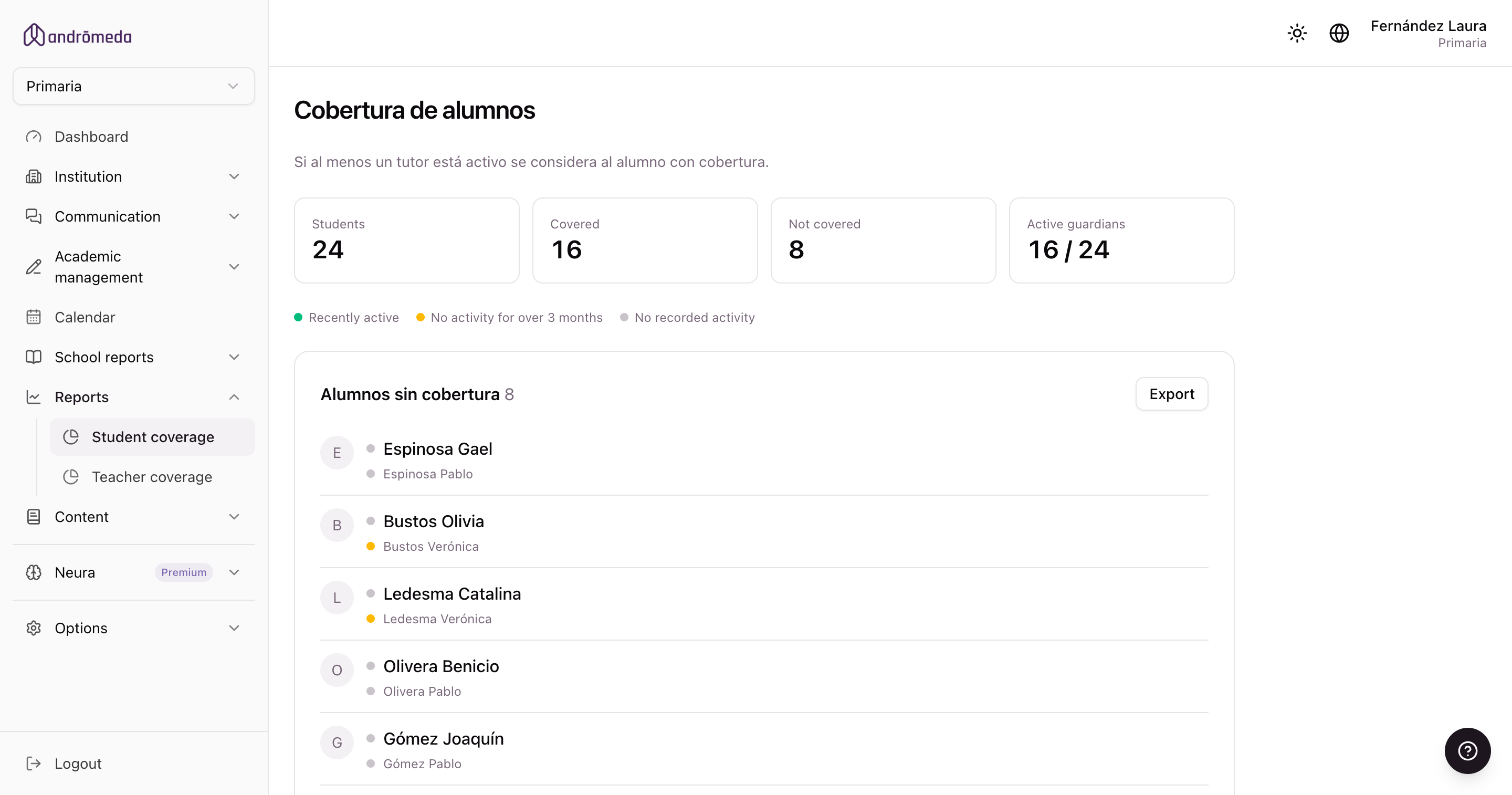
Student coverage
Shows which students are reached by what the school communicates, by looking at whether their guardians get into the app.
- A student is covered if at least one of their guardians has been in within the last three months.
- The coloured dot next to each guardian shows how long ago they were last in: active, a long time ago, or never.
- Each block can be downloaded to Excel to work the list outside the system.
Especially at the start of the year, which is when disconnected families show up: new ones who haven't installed the app and ones who changed phones.
What to do with the list
Download the students without coverage to Excel.
Cross-reference with the phone numbers held by administration.
Contact those families another way
Phone, notebook, or at the school gate.
Help them install the app
And if needed, resend their password from the guardian's record. → Students and guardians
Check the report again in two weeks
To see how many you recovered.
Teacher coverage
The same thing, but looking at the school team: who is using the platform and who isn't.
- A teacher counts as active if they've been in within the last twelve months.
- Both blocks download to Excel, including the date each one was last in.
Guardians are measured over three months and teachers over twelve, because the usage differs: a family goes in every time they're notified, whereas a teacher can have quiet months and still be an active user.
A teacher who has never been in isn't usually someone resisting: it's usually someone nobody showed. The list tells you who to invite.
A group's coverage
From a group's record you can open the same report, narrowed to that class.
That's the practical version for working through it with the teacher in charge: their own group rather than a whole-level list.
→ Groups
The Summary
The panel's home screen also has two coverage charts —students and teachers— so you can see it at a glance without opening the reports.
It means a share of families isn't hearing what you send. It's the clearest sign that something needs doing before you carry on communicating.
The summary also shows the level's totals, a chart of how many messages were sent each day of the month, the messages awaiting your approval, and platform news.
